What Is Uizard?
Uizard is an online design tool made for people who want to create apps, websites, or UI designs without learning complex software. Many users choose it because it is clean, fast, and very easy to use. You can start a project from scratch or use one of the many templates already available. Uizard focuses on quick uizard review design building, which helps beginners and professionals save time. Its interface is simple enough for new users while still offering features that support more advanced ideas.
How Uizard Works
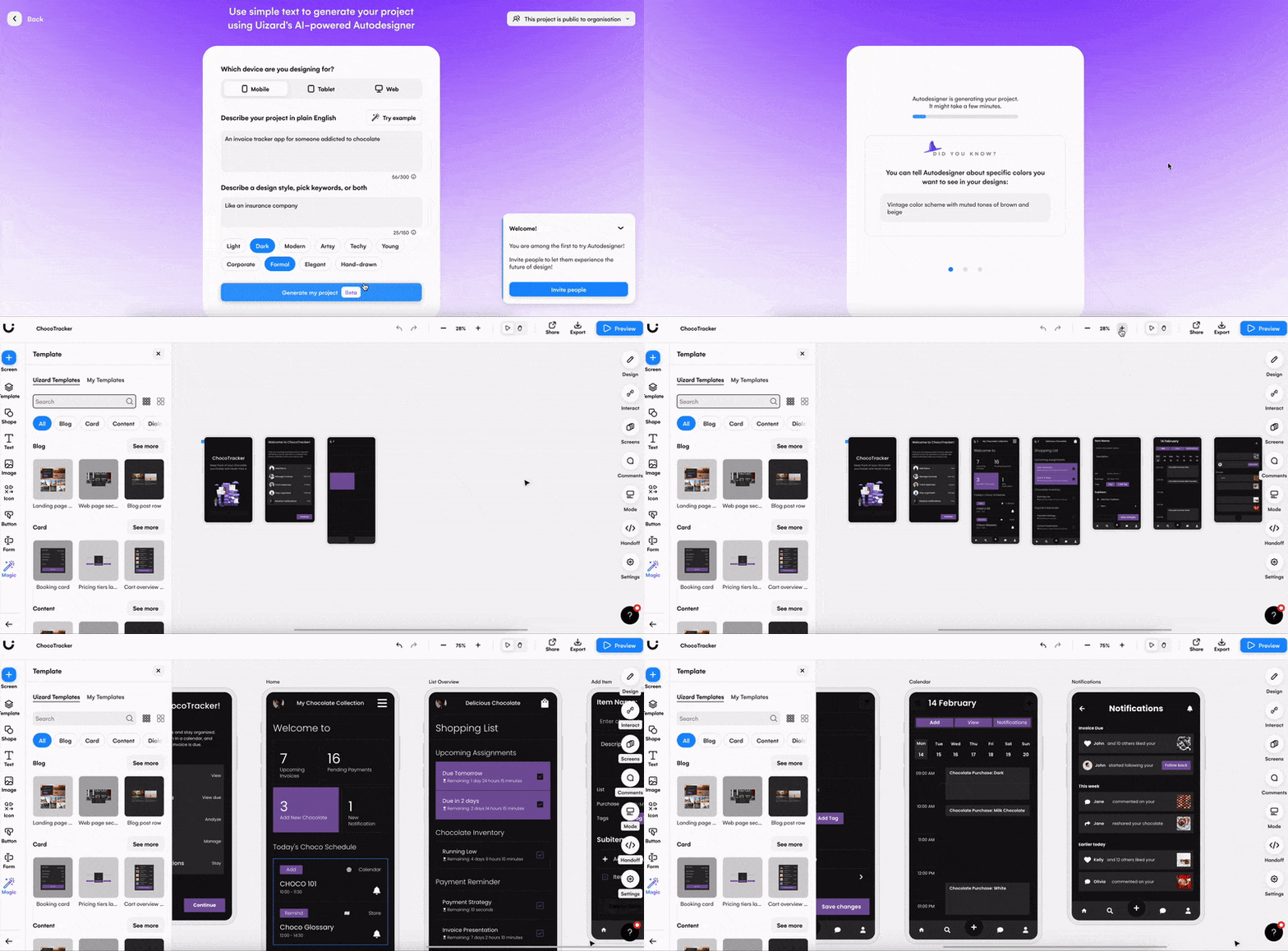
Uizard works through drag-and-drop components, which means you don’t need to draw or code anything yourself. You just pick the items you want on your screen, place them where they fit, and adjust their size or style. One of its standout features is the AI that can turn hand-drawn sketches into digital designs. This tool is helpful for users who like drawing rough ideas on paper but want to turn those ideas into clean designs without spending hours recreating them. You can also import screenshots of other apps to use as inspiration or reference. Uizard reads them and helps you recreate similar layouts.
Templates and Design Options
Uizard comes with many templates for mobile apps, web pages, landing pages, and dashboards. These templates let you start fast and stay organized. You can change colors, fonts, layouts, and more without any difficulty. Each element is adjustable, so you can make your design look exactly the way you want. For users who are not confident in their design instincts, Uizard also gives styling suggestions. This makes it easy to keep your project clean and balanced even if you are new to UI design.
AI Features That Stand Out
The AI features are the highlight of Uizard. Besides sketch-to-design, it can also generate themes from images. For example, if you upload a photo you like, Uizard will detect the colors and create a matching color theme. This is useful for users who want a unique look but don’t know how to choose colors. The AI can also help with layout suggestions, which means it can show you better options for your design based on what you already have. These features save time and reduce confusion for beginners.
Who Should Use Uizard?
Uizard is a great choice for beginners, students, startups, and even marketers who need simple designs for pitches or presentations. Professionals who want fast prototypes will also find value in it. It’s not a full replacement for heavy design tools, but it is perfect for quick mockups and wireframes. People who work with teams will also like Uizard because it supports easy collaboration. You can share your project link and let team members view or comment.
Pros and Cons of Uizard
Uizard has many strengths. It is easy to learn, fast to use, and powered by helpful AI tools. The templates help you start quickly, and the drag-and-drop system keeps everything simple. Its collaboration features also make it suitable for teams. However, users who need deep customization or professional-level design control might find it limited. It is built more for speed than for advanced detail, so experts may still prefer tools like Figma for complex work. Still, for most people who need clean and quick designs, Uizard works very well.
Final Verdict
Uizard is one of the easiest design tools available today. It focuses on helping users turn ideas into designs without stress. The AI features, simple interface, and ready-made templates make it ideal for beginners and anyone who needs fast prototyping. While it may not replace advanced tools for detailed design work, it does an excellent job for quick UI layouts, concepts, and drafts. If you want a tool that gives you speed, comfort, and helpful automation, Uizard is worth trying.
Is this conversation helpful so far?
About the Author
